
Radio Streamer documentation
Install, configure, and troubleshoot Radio Streamer for OBS Studio on macOS.
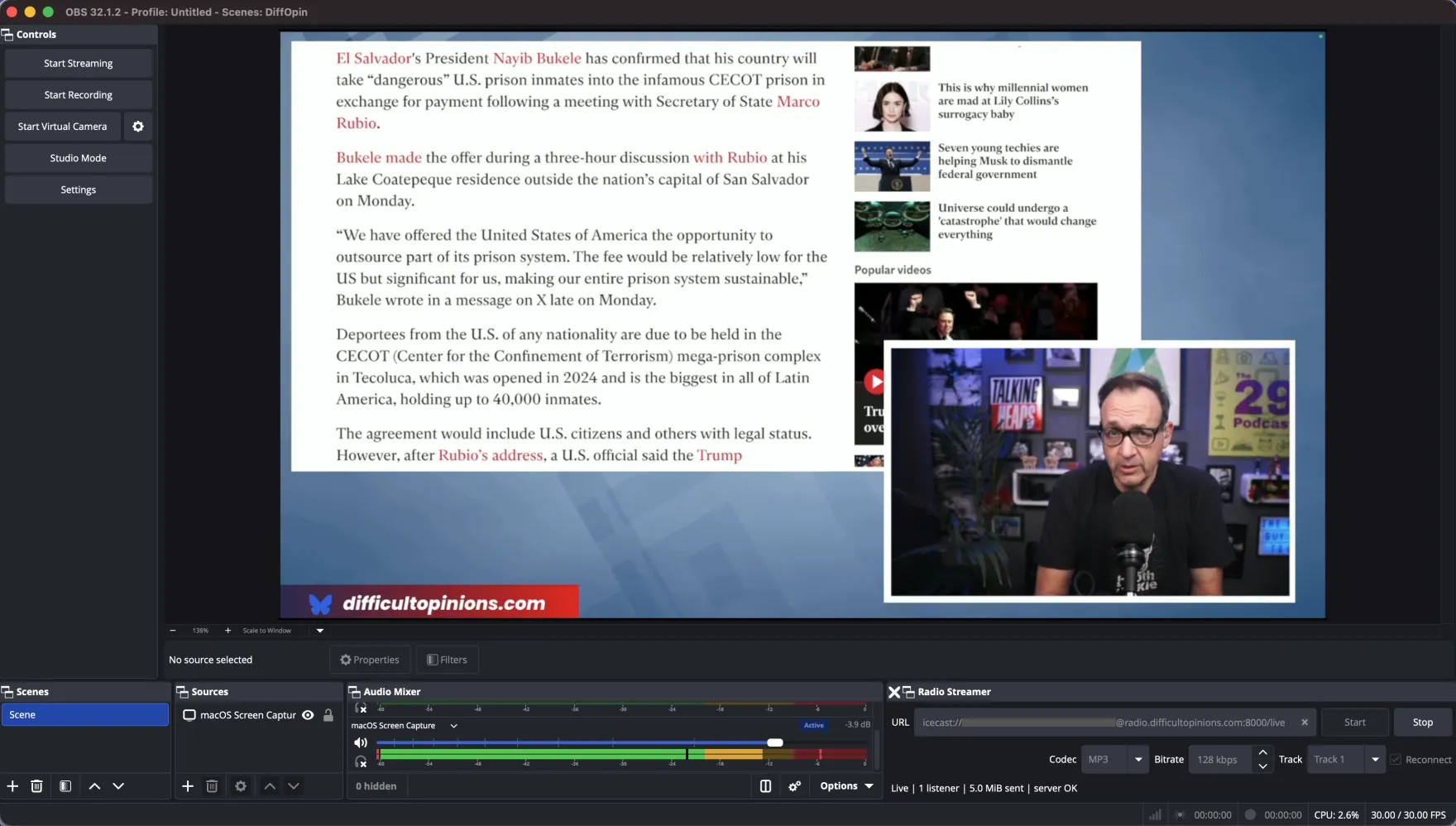
Install
Released builds target macOS on Apple Silicon. Quit OBS first, then unzip the download to get radiostreamer.plugin and copy it into the OBS user plugin folder:
mkdir -p "$HOME/Library/Application Support/obs-studio/plugins"
ditto radiostreamer.plugin "$HOME/Library/Application Support/obs-studio/plugins/radiostreamer.plugin"
Restart OBS. The dock should appear under Docks > Radio Streamer. If it isn't visible, enable it from that menu.
First stream
- Open
Docks > Radio Streamer. - Paste your Icecast URL into the URL field (see format below).
- Pick a codec (MP3, AAC, or Opus) and a bitrate.
- Pick an OBS audio track (1 through 6). The plugin reads from this track only.
- Optionally enable Reconnect.
- Click Start. The status indicator turns active when the connection is established.
Stop ends the stream cleanly. It does not affect the main OBS recording or streaming output.
Icecast URL format
icecast://source:password@server:port/mountpoint
The server portion can be either a raw IP address or a hostname like radio.yourdomain.com. Using a hostname requires a DNS A record in your domain's zone pointing at the Icecast server's IP.
URL-encode special characters in the username, password, or mountpoint. For example, an @ in a password becomes %40, a : becomes %3A, and a space becomes %20.
Examples
icecast://source:hunter2@198.51.100.10:8000/live.mp3
icecast://source:hunter2@radio.example.com:8000/live.aac
icecast://source:p%40ss@radio.example.com:8000/live.opus
Codecs and bitrates
Pick whichever your players and platform support. The plugin uses FFmpeg to encode and pushes to Icecast in the matching container.
MP3 (libmp3lame)
Most compatible. Works in browser audio elements, every podcast app, every legacy player. Use 128 kbps for talk, 192 to 320 kbps for music.
AAC
Better quality at the same bitrate as MP3. Widely supported in modern players. Use 96 to 128 kbps for talk, 128 to 192 kbps for music.
Opus (libopus)
Best quality per kilobit. Use it when you control the player and bandwidth is tight. Some legacy clients and CDN edges do not handle Opus over Icecast cleanly, so test before relying on it for a public mount.
Audio track selection
The dock has a single track selector covering OBS audio tracks 1 through 6. Whatever sources you have routed to that track in OBS Audio Mixer settings is what gets streamed. The plugin downmixes to stereo s16le at the active OBS sample rate before encoding.
If you want different mixes for your main stream and your radio feed, route different sources to different tracks in OBS, then point Radio Streamer at the radio track.
Reconnect behavior
When Reconnect is enabled, the plugin retries on disconnect using a fixed backoff: 2 seconds, then 5, then 10, then 20, then 30 seconds, then continues at 30 seconds. Pressing Stop cancels reconnect immediately.
Reconnect handles transient network drops and Icecast server restarts. It does not handle permanent authentication failures, since retrying with bad credentials would just spam the server.
Requirements
- OBS Studio 31.x
- macOS on Apple Silicon
- FFmpeg on
PATH,/opt/homebrew/bin/ffmpeg,/usr/local/bin/ffmpeg, or/usr/bin/ffmpeg - FFmpeg must include the
icecastprotocol pluslibmp3lame,aac, andlibopusencoders
Homebrew's default FFmpeg formula includes all of the above. Verify with:
ffmpeg -hide_banner -protocols 2>&1 | grep icecast
ffmpeg -hide_banner -encoders 2>&1 | grep -E "libmp3lame|^ A...... aac |libopus"
Troubleshooting
The dock doesn't appear after install
Confirm the plugin is at ~/Library/Application Support/obs-studio/plugins/radiostreamer.plugin (case-sensitive). Open Docks > Radio Streamer from the OBS menu bar to enable it. Check the OBS log (Help > Log Files > View Current Log) for plugin load errors.
FFmpeg not found
Install FFmpeg with Homebrew (brew install ffmpeg) or place a build at one of the search paths listed under Requirements. The plugin does not bundle FFmpeg.
Connection refused or timeout
Check that the Icecast server is reachable on the port you specified (curl -v http://server:port/). If you used a hostname, confirm DNS resolves correctly. Firewalls and cloud security groups commonly block source ports like 8000.
401 Unauthorized
Source username and password are wrong, or the mountpoint requires a different role. Test against the server with a known-good source like ezstream or butt to isolate the issue.
Audio is silent on the listener side
Confirm the OBS track you selected actually has audio routed to it (check Advanced Audio Properties). Verify the mountpoint accepts the codec format the plugin is sending (an .mp3 mount expects MP3, not AAC).
Stream cuts out periodically
Enable Reconnect to ride out transient drops. If drops are frequent, check upstream bandwidth and packet loss between the OBS host and the Icecast server. Lower the bitrate to give yourself more headroom.